


Bugs are inevitable in software development. What matters most is how quickly they are identified, documented, and reported so developers can fix them efficiently. In this article, we’ll walk through a real-world example of reproducing a bug, gathering evidence, and creating a structured bug report. This process was demonstrated in a video where the tester recreated the issue step by step.
Step 1: Reproducing the Bug
The tester begins by logging into the application after registration. From there, the following setup is performed: ✅Create a Template. A new test template is added to the system to ensure campaign creation can proceed.
✅Add Recipients. Two email addresses are entered: a personal email and a work email. These form the recipient list for the test campaign.
✅Configure SMTP Settings
Gmail is used as the SMTP provider. The tester sets the host, port, and password to enable sending emails.
✅Create a Campaign. With a template, recipients, and SMTP in place, a new campaign is created and sent.
The Problem: Instead of sending, the campaign fails. An error message is displayed, and no email reaches the recipient.
Step 2: Documenting the Bug
Once the issue occurs, the tester proceeds to create a proper bug report. This is where structured documentation ensures clarity for developers. 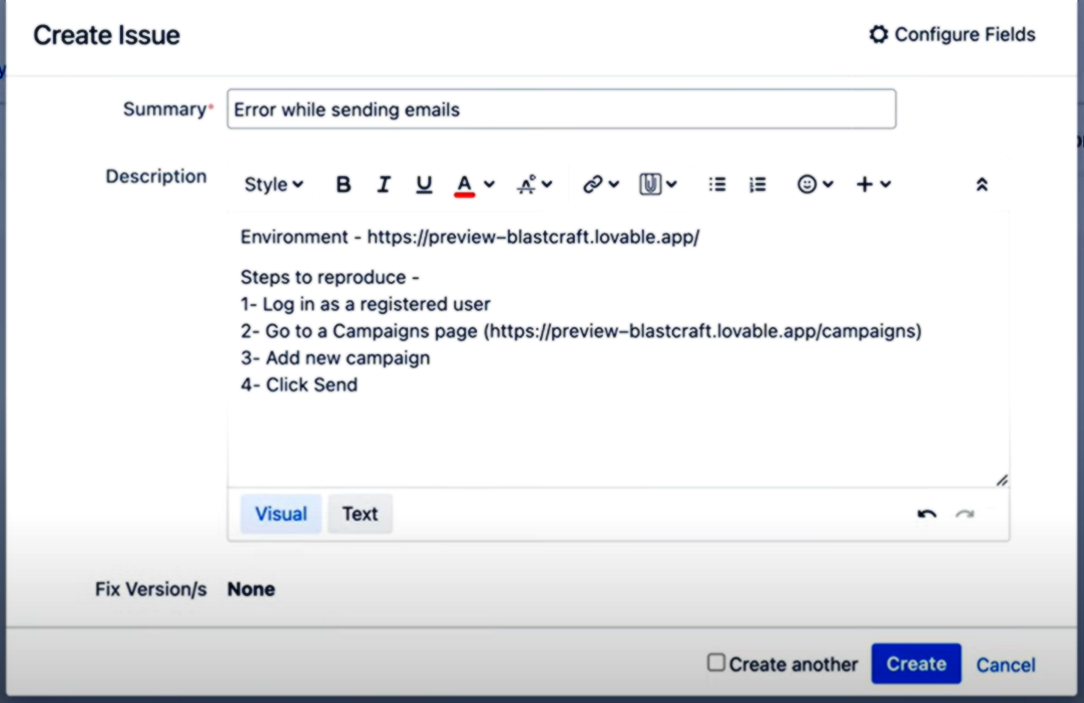
The report includes:
- Environment. The platform and setup details (registered user, Gmail SMTP, etc.).
- Steps to Reproduce
- Log in as a registered user.
- Add a template.
- Add recipients.
- Configure SMTP with Gmail.
- Go to the Campaigns page.
- Add a new campaign and send.
- Actual Result. An error appears, and no email is delivered.
- Expected Result. No error is displayed, and the recipient successfully receives the email.
This clear separation of actual vs. expected behavior is critical for developers to pinpoint the issue.
Step 3: Why This Process Matters
Creating a detailed bug report is more than just noting “it doesn’t work.” It gives the development team everything they need to:
- Reproduce the issue in their own environment.
- Understand the context and configuration.
- Fix the bug faster without back-and-forth clarification.
A well-documented bug report accelerates the feedback loop, reduces frustration, and ultimately improves software quality.
Key Takeaways:
- Always reproduce the bug before reporting—it ensures the problem is consistent.
- Provide step-by-step instructions so anyone can follow the path to the error.
- Clearly define the actual vs. expected results.
- Don’t forget to include environment details (browser, SMTP provider, etc.).
By following this structured approach, testers and QA engineers become a vital bridge between users and developers, ensuring issues are resolved quickly and efficiently.
📹️Want to see the full walkthrough?